

Applications
The Applications page in Curade Mini shows how real users experience each monitored application, with Apdex, sessions, users and where they connect from.
On this page
Applications covers what real users experience: how satisfied they are, how much they use each application and where they connect from. Engineers open it; Admins do not.
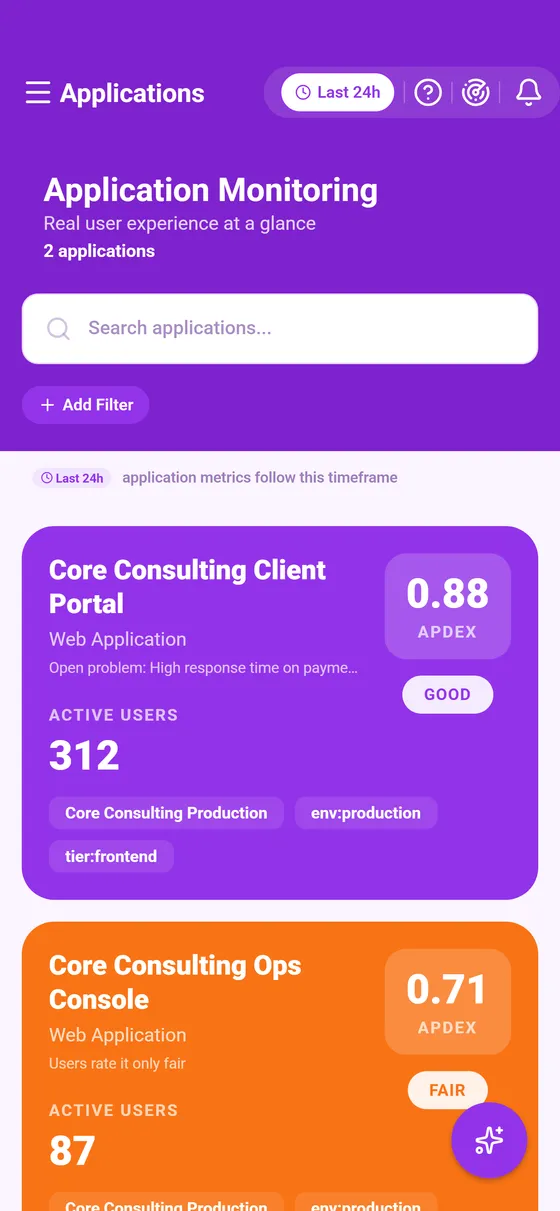


The list
Each card shows the application's name, its kind and its headline figures over your time window. Search by name, and Add Filter narrows the list further. A tally under the page title counts what the list holds, or the matches when a search or a filter is on.
An application that needs attention carries one plain line on its card saying why: an open problem names it, it had no user activity in the window, users rate it poorly or only fairly, or it calls a service that has an open problem. When several applications on screen share a cause, a line above the list says so.
The application's page
- The header: name, kind, management zones and tags, the Apdex score and active users, with Copy details. Tapping a zone or a tag opens the list narrowed to it.
- What's behind these numbers, where Cluemetry explains the readings over your window (Cluemetry).
- The headline figures over the window.
- Related Problems, the problems raised against the application inside the window, each badged as ongoing or resolved.
- The relationship map: the services the application calls, and the hosts each of those runs on (Relationship map).
- Geographic breakdown, where the traffic comes from. An empty map means the environment does not report it.
Reading the figures
| Figure | What it means |
|---|---|
| Apdex | User satisfaction from 0 to 1. The closer to 1, the more users get responses fast enough to be happy with them. |
| Sessions | How many user sessions were recorded over the window. |
| Active or Inactive | Whether users were active in the window. Inactive means no recorded activity, not that monitoring stopped. Widen the window to tell a quiet spell from a retired application. |
Every figure follows the time window, so widening or narrowing it changes them.
This page describes Curade Mini 1.0.0.