

Problems
The Problems page in Curade Mini lists the problems open and resolved in your time window, with each one's root cause, why it happened and what it touched.
On this page
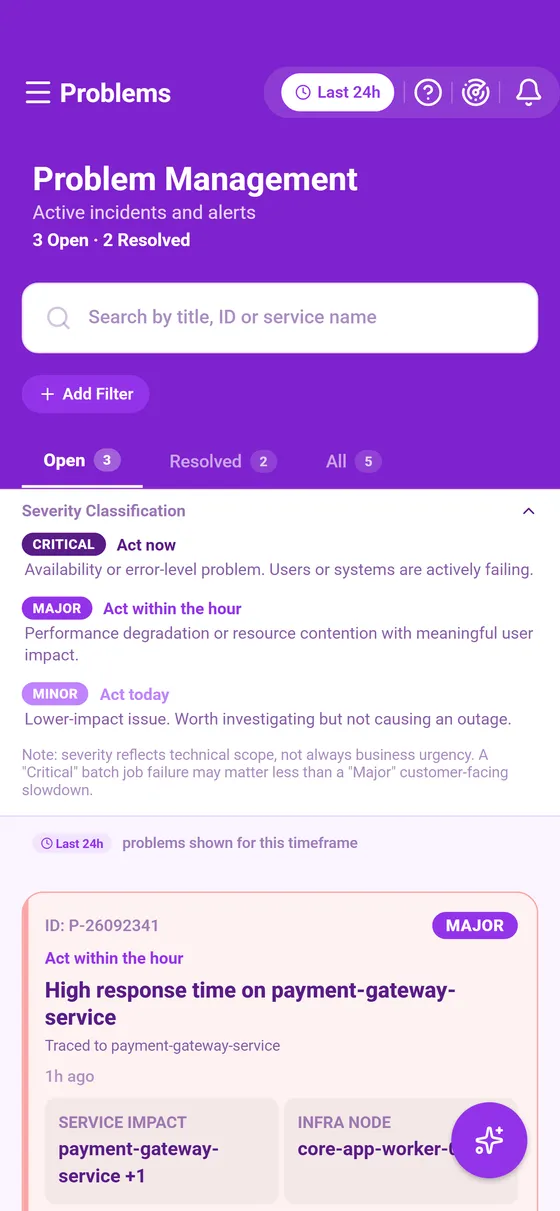
Problems lists what monitoring detected as wrong in the environment over your time window, the most urgent first. Engineers and Admins both open it.

The list
- Search by title, by the ID on a card (such as P-26102058) or by the name of an affected service.
- The Open and Resolved tabs split the list, and each tab's count follows the search and the filters.
- Add Filter narrows the list by severity, impact and affected entity, and each filter shows as a chip you can remove on its own.
- The severity legend above the list explains the colours on the cards.
The list covers your time window: a problem that opened and closed outside it is not listed. An open problem's card carries one plain line saying why the problem is there, such as the item monitoring traced it to, and when several problems on screen share a cause, a line above the list says so.
A problem card
- Investigate opens the problem's own page.
- View Details opens the card in place, with the root cause and the latest comments and who wrote them. Collapse folds it again.
The problem's page
From the top down:
- The summary: title, severity, status, when it was detected and the management zones it was raised in, with Copy details at the foot of the card.
- Why this happened, where Cluemetry sets out why the problem is there (Cluemetry).
- A key saying what each number covers: the problem from its first event to now, apart from its status and severity, which describe the problem as it stands.
- The root cause, when monitoring named one.
- The relationship map of the services, applications and hosts the problem touched (Relationship map).
- Event Logs, in two groups. Part of this problem holds the events monitoring recorded as the problem's own evidence, and Around the same time the events on its root cause and affected items, and on the processes of any host among them, from half an hour before it started until it ended.
The page reads the same whatever your time window: the window decides which problems the list shows, not what a problem's page holds.
Asking CLEO about a problem
Ask CLEO about this, at the foot of Why this happened, opens CLEO with a question already written and the explanation handed over. The floating CLEO button works too: CLEO already has the problem's title, severity, status, affected items and events (CLEO).
Opened from an alert
A problems alert opens this list with a From your alert banner saying what the alert said and when, and a From alert chip narrowing the list to the alert's problems. Each of those cards carries what the alert said of it, such as New, Open too long or Back to normal. Clearing the chip shows every problem again.
This page describes Curade Mini 1.0.0.